
Wordpress Info You Can Use
Wordpress Information for WP Users
Deleting a menu item in WordPress
Sometimes we need to delete unnecessary menu items from WordPress menu. Follow the steps below to do that: Deleting a menu item in WordPress STEP 1 : To delete a menu item in WordPress, find the Menus menu in the WordPress Dashboard Navigation menu. STEP 2 : Select...
Adding a submenu item in WordPress
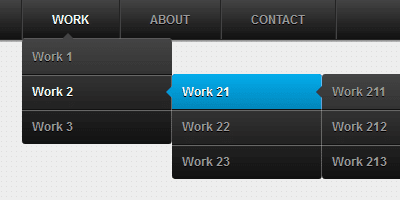
We can add a submenu item under the main menu item by following the steps below: Adding a submenu item in WordPress STEP 1 : To add a submenu item to a WordPress menu, find the Menus menu in the WordPress Dashboard Navigation menu. STEP 2 : Select the menu item which...

Adding a Category to a WordPress Menu
If we need to add a Category to the WordPress menu, we can follow the steps below: Adding a Category to a WordPress Menu STEP 1 : To add a category to a WordPress menu, find the Menus menu in the WordPress Dashboard Navigation menu. STEP 2 : Click Categories and add...

Adding a page to a WordPress Menu
We can manage WordPress menu by adding pages. Follow the steps to do this: Adding a page to a WordPress Menu STEP 1 : To get started adding a page to your WordPress Menu, find the Menus menu in the WordPress Dashboard Navigation menu. STEP 2 : Select the page from the...

Adding a custom link to a WordPress menu
Sometimes we need to add custom links to the WordPress menu. We can do that by following the steps below: Adding a custom link to a WordPress menu STEP 1 : To add a custom link to a WordPress menu, find the Menus menu in the WordPress Dashboard Navigation menu. STEP 2...
Uploading a picture in WordPress
Adding a visual element like a picture is a great way to rank up your post or page content. Follow the steps below: Uploading a picture STEP 1 : Open page or post editor where you'd like to insert your picture. STEP 2 : Above the Post editor toolbar, you'll see an Add...

Podcasting -WordPress for Business- Part 4
This is part 4 in a WordPress for Business series WordPress for Business Part 1 - "Smart Forms" WordPress for Business Part 2 - Booking Plugins WordPress for Business Part 3 - Ecommerce Everyone has some experience that would be useful to someone else. There are an...
Deleting a WordPress Plugin
Sometimes you need to delete unnecessary plugins. Follow the steps below to delete a plugin from your WordPress Website: Deleting a plugin STEP 1 : Go to the Plugins menu from your WordPress Dahsboard. STEP 2 : We need to deactivate the plugin first. So find the...

Our One on One WordPress Training Works!
For over 13 years we have helped many site owners and businesses learn how to use WordPress more effectively.
Whether you are a beginner or just someone who needs help because they are “stuck” – we can help you.
One on one training is the most effective type of training for WordPress because it allows you to ask the types of questions that will solidify your understanding and help you grow your audience, sell your product, or gain more customers.
We help with everything from simple WordPress blogs to complex WordPress Multisite issues.
Some of our One on One Clients: